Friday, October 15, 2010

Working the iPad: Best inking/handwriting applications

By Laura Haight

Since my iPad and I embarked on our journey together, I've tried - really, really tried - to be totally paperless. It's a goal I have championed for years and, in various career incarnations, tried to move toward.

But there are those times and certain situations where my brain and hand just talk to each other and - unbidden and unstoppable - I reach for a pen and a notebook.

My paper notes are usually brief - jot down a phone number or email address, a few keywords or mind joggers, a quick task list.

So, I thought, maybe there's an app for that - an iPad tool to let me handwrite quick notes and export them to other tools. Many of the note-taking applications that I experimented with (see Working the iPad: Best Note-Taking Applications) had a component that allowed inking/handwriting, so I started there.

Here are the guidelines:

First, if you are a woman and you have any kind of fingernails at all, you will need a stylus. With any kind of protuberance at the end of your finger that blocks your fingerTIP from making full contact with the iPad surface, your writing results will be unacceptable. The screen shot at right of my inking without a stylus gives you a good idea of what the problem is.

Second, a note is meaningless if you can't get it out of the iPad and into some actionable form. This is the challenge with note-taking
applications as a whole and why - Steve Jobs would kick me out of the orchard for
saying this - Microsoft's One Note remains the best note-taking app I've ever used and the standard by which all the others are judged.

Finally, it would be great if a good note-taking application also offered good inking features.

Most inking apps make a big deal out of offering different pen styles, different colors and line weights. That's important if you are drawing, but if you are note taking - that's not the higher priority. So if that's all they had to offer, I didn't consider them. Some of the many apps out there with inking capabilities are designed to let you express yourself more personally by handwriting your emails, or sticky notes. And I didn't consider those for this purpose either.

This narrowed my field down to four: Inkiness, Notify, SmartNote and Penultimate.

I had great hopes for Inkiness ($3.99) which I found through the Evernote Trunk - a collection of add-ons or affiliate apps that extend the functionality of Evernote. I don't think of Evernote as a note taking tool, but it is by-far the best tool for organizing information and keeping it tagged and accessible. The Inkiness app is lean - no vast selection of the design of the paper I am writing or drawing on, limited ink color choices and only three line weights are offered - fine, medium and broad - common fountain pen nib options. One nice feature is being able to select the way the way your fingertip or stylus will position on the surface both in terms of proximity to the virtual nib and also angle. So if you are right or left handed you can make adjustments to improve the accuracy and appearance of your notes.
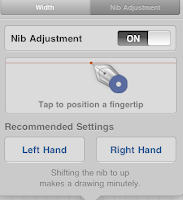
Still you are forced to write HUGE. It seems that the stylus makes this unavoidable, no matter what line weight or nib selection you make. Inkiness does seemlessly transfer to Evernote, as well as Twitter (although why you would want to I haven't figured out yet), to email, your photo gallery or to the clipboard.

There are several real problems - or maybe it's more fair to call them limitations - with Inkiness. First, no wrist-safe zone. You really need this with the iPad or you have a lot of unwanted marks and distractions. Second, each note is one page. There is no note
book or file structure within the app itself. So if you are taking notes during a meeting and they spill over to a second or third page, those are all lose pages with no way to append them. If you use Evernote, there is a merge function, but if not you are on your own.

Bottom Line: Evernote users may put up with the shortfalls to the get the integrations, but anyone else will likely find this app is quite ready for prime time yet. I will, however, watch for updates.

Notify ($.99) is another Evernote Trunk find. This is a more full-feature
d program and it's big selling point is that you can import web pages, documents, pdfs and annotate them with your own handwriting and drawings and then export them back out - including to Evernote, Google Docs, Dropbox and Box.net. This is a useful program for annotating pdfs and web pages. It's got a wrist-safe area and a full array of pen styles, widths and even different colored highlighters. You can change your paper style (lined, legal, white, yellow) if that's a big driver for you.

One- and two-fingered operations let you draw boxes and circles. There are fairly thorough object manipulations available. Type handling also has some neat features like the ability to calculate simple formulas and to translate text into dozens of different languages.

You do have the ability to create tags for your notes within Notify and to perform a full text search if your notebook gets sizable.

Bottom Line: A lot of features, a good tool for annotating. Navigation confused me a little and I am still trying to figure out how to close a note.

SmartNote ($2.99). In my previous look at Note-taking apps, I found SmartNote to be the all around best product for note taking. This remains true and it will allow you to integrate inking with typing. SmartNote lets you create as many notebooks as you want so you can keep notes organized by topic (this would be a big plus for students). You can bookmark pages and notes to make them easy to find later, add audio recordings and use an array of pre-built widgets to add drawings, graphs, musical notations and more to your notes.

For students - especially those studying music, science or math - SmartNote is a must-have app. For business, there are a few challenges. The handwriting appearance is jaggy - even with a stylus - but gets better with experience. You only have two things to do with your notes/notebooks when you need to integrate them with other applications - Export a PDF or Email a page - which comes over as a .png file. Exporting a PDF gives you several good options: export the entire notebook or just specific pages or page range, include the notebook background or not, change the image quality to make the file smaller if you need it to be and email it or save it in a documents folder.

Your recordings can be emailed separately, but if you email the note any associated recordings do not come along with it.

Bottom Line: smartNote does a lot, but I started out looking for a quick way to take notes on the go. This is not smartNote's forte. Still if you're looking for a good note-taking program that you can work in 75% of the time, this may be it.

Penultimate ($3.99). This app advertises itself as the best handwriting note app in the App Store. Although it seems like you are paying more for the app that does the least, it's more that you are paying more for the app that focuses on doing one thing. The interface is simplicity - choose one of three line widths and six colors and start writing (or doodling, if the artistic spirit moves you). There are no boxes to get in the way, no questions of whether to type (you can't) or write. The fewer moving parts, the less to get in the way of the single purpose - taking some quick notes.

Bottom Line: It's odd as I look at my evaluation, but this is my favorite app for this purpose. Don't get me wrong: This is not an app for writing. You won't want to take copious notes in long meetings or lectures. And the export options are limited to email, which fails on one of the two things I was looking for - something to integrate with Evernote. So it seems unlikely that this should be my favorite. But its simplicity and ability to do the one thing well won me over. It looks and feels like exactly what I was looking for - a pen and a notebook.

Any of these four programs will fill the handwriting and note-taking role - some with more features, some with less. What those who like to write know is that ultimately it comes down to intangibles - the weight of a fine pen in your hand, the feel of the nib on quality paper. And so it does with these apps. If it feels right, go with it.
--------
Portfolio provides services to small businesses in communication, technology and training. Want to integrate iPads and iPhones into your business but worried about communication with your enterprise and legacy servers and software? Contact us for a free consultation about how to help your workforce be more mobile and more productive.

We believe in sharing information that assists small businesses to be more efficient, productive, and profitable. So we pass on information for free through our blog, Facebook Page, Twitter account and email newsletter. Don't miss a beat and subscribe to the newsletter. You'll get some great information and special offers!

Friday, October 1, 2010

Hire the unemployed: There's a lot more than a tax break in it for you

Many businesses have the impression that if you are unemployed, it's somehow because you deserved it. It has been reported that many businesses won't even look at your resume if you don't currently have a job.

The ranks of the unemployed are disproportionately swollen with older workers, laid off by companies not only trying to reduce the size of their workforce but the payroll of the remaining workers as well.

There are many misconceptions at play here, many of which I admit to having as a hiring manager. But the perspective from the other side of the desk is enlightening and a bit humbling.

So let's start with this: Thanks to the stimulus, businesses that hire unemployed people to fill NEW positions before January 1 will receive a significant tax benefit, according to Gail Rosen, a New Jersey CPA.
  • The IRS will exempt you from paying the employers share of Social Security taxes (6.2%).
  • If you keep the employee for a full year and their salary is more than $16,129, you can claim a $1,000 hire retention credit on your 2011 income tax.
But there are so many other reasons to turn to one of the largest pools of experienced, tried and tested workers when you have a position to fill.

For example:
  • Older workers are having a harder time than other demographics finding a job. A recent article by The New York Times suggested that for workers over 50 laid off in this recession, the prospect of never working again is a dark reality. Click here to read the article. That tends to make them more appreciative of opportunity.
  • It's sale time! Unemployed workers who have been looking for work for many months and, in many cases, more than a year, are often willing to accept a sometimes significant salary reduction. Companies have an opportunity to bring on someone with more experience and expertise than they could normally have afforded.
  • Workers who have suffered the indignation and humiliation of losing a job know what is waiting "out there." They are likely to be more committed to doing a good job and less focused on looking for the next big thing.
  • Older workers have a lifetime of experience and seasoning they can bring to your workplace. The have "been there, done that" and can offer a different perspective than you might currently have on your team. That doesn't have to translate into being a "downer" for a younger team, but perhaps in providing another voice, a potential mentoring capability.
What they won't be doing:
  • Playing Farkle and growing vineyards and farms on their Facebook pages during the work day.
  • Bad-mouthing your company on public websites, social networks and to friends and family.
  • Shaving time out of the workday to work on their resume, go for interviews, or use your clients as networking contacts for their next job.
Many of the older unemployed worked for their former companies for decades. That kind of loyalty is less valued today, but the work ethic these individuals embody of commitment, hard work, and loyalty to an employer are a good fit for any business.

Finding an inhospitable job climate for their skills and experience, many of these workers have started their own businesses, consulting firms or freelance services. So even if your firm isn't hiring, you can find some outstanding talent in the ranks of freelancers and small service firms. These are often people you could not have afforded on your team just 3-5 years ago, whose services are now available to you on a contract or per-job basis.

Whether your business needs to ramp up for a project, staff up for a contract job or bring on permanent staff, you are in a fortunate situation.

Portfolio can help you with an array of expert freelancers in communication, HR, accounting, design and technology. We harness the power of decades of skill and experience to bring turnkey solutions to your business needs. Contact us for a consultation. And put our team to work for your team.


Tuesday, September 21, 2010

Ideas in a vacuum

By Laura Haight

What turns an idea from the spark of fleeting inspiration to a tangible service or product?

Are you the kind of person who churns out a lot of ideas and then bounces them off others? What if an idea just lives in your head?

For many new entrepreneurs, work is done on the phone, on the road, in a home office. Single-person consultancies or one- and two-person businesses lack the whiteboards, projectors, conference tables, mind mapping and brainstorming infrastructure of the corporate world.

An idea is defined as "any conception existing in the mind as a result of mental understanding, awareness, or activity." So what takes an idea from existing in the mind to an actionable plan, product or business?

In my experience, it's the process of having it kicked around by others. Throw it on the table and get feedback good and bad from others with experience, or even those who can bring a fresh perspective. In the newspaper business, often the best feedback came from those who looked at ideas from a reader's perspective, not a journalist's.

Ideas are like children. To thrive, they need nurturing and caring. But they also need discipline and critical appraisals. They need challenges to overcome and goals to attain.

For a small or one-person business, the ability to kick ideas around, to help shape them with others' ideas and experiences, to benefit from what-if scenarios proposed by people who have "been there, done that", leaves a big innovation void.

Don't let your ideas die for lack of water and sunlight. Here are some options:
  • Create an advisory board for your business. This might be comprised of friends or associates, but it should be a group that will fairly and honestly evaluate your ideas and proposals and offer impartial and honest insights. You don't want a bunch of "yes-sers".
  • Set up an informal focus group for an idea that has a specific target audience. Large businesses and marketing companies do this all the time - and often at considerable expense. But it doesn't have to be costly. If your idea is for a product that would appeal to families or parents, for example, you can post questions on parenting websites and ask for feedback. Or post an invite at your church or school PTA and invite four or five people to sit down and give you informal responses to your idea. People like to be asked their opinions. Your challenge is to weigh individual opinions against individual biases. Try to find people who don't know you - that way their opinions won't be influenced by their personal feelings. Remember, just because one person says an idea doesn't work, doesn't make it a bad idea. Look for the useful information and inform your decisions with it.
  • Find a networking group of like-minded entrepreneurs and experts and use it as a sounding board/brainstorming group. Chances are there are many others in the same position you are.
Some things to beware of:
  • In a corporate environment, you are all on the same team. In an entrepreneurial environment - to some extent it is everyone for themselves. Be wary of disclosing too much about your idea.
  • If you set up a board of advisors, you may want to ask each board member to sign a non-disclosure agreement. There are many available online (here's one), but you should always make sure to have any legal documents vetted by your attorney. The version I've posted here is a sample of what's available, but has not been vetted.
  • Our opinions are informed by our experiences and biases. So you must take them with a grain of salt. Remember, ultimately it's your business and it's your decision.
Ideas rattling around in the heads of people just like you were the start of every great movement, product, service or initiative that has every occurred. What made them great was that they were acted upon.

What's your great idea?
-----------
Like the concept of an ideas group? I'd like to know if there's potential to start something locally in the Upstate of SC or potentially virtually to bring in people from around the region. Please comment and give me your ideas!


Thursday, September 16, 2010

Commonsense on social media

In a way, it isn't surprising that the The Ford social media guidelines have been getting a lot of play this week on blogs, Twitter and Facebook. After all, they are concise, clear and do a good job of stating principles that seem like no-brainers.

And there's the surprise. Apparently, they aren't no-brainers. Honesty, clarity, respect, judgment and awareness.

Employee interactions in social media have been a major conundrum as businesses have tried to figure out and to articulate where the employee stops and the individual begins. Even in Ford's well- articulated policy the individual and the employee are centaur-like.

But the clarity of it's guidelines is something other businesses could benefit from in all communications with employees. Too often businesses wait until there's a problem and then try to create policies on the fly based on how they handled a single incident.

Consistency may be the hobgoblin of little minds, but in dealing with employees it is essential nonetheless.

Policies are generally meant to address the vast majority - probably 80-95 percent of employees. There are always some exceptions,special circumstances and unique situations that require special handling. Manageers often overcomplicate issues; trying to create a bullet proof policy that will apply to every single situation. The result may be that it takes too long to get information out to employees, or that the policies become so long, detailed and obfuscated by legalese that they employee neither reads nor understands.

Policies also have to be adaptable to change, especially those that deal with technology, the Internet, and social media. Just a few years ago companies primarily concerned themlves with how much their employees were using their work computers for personal business like email, shopping and - of course - viewing adult sites. Those policies must now adapt to what an employee posts online on their own time,to what they view or read on their company smartphone and how their public statements impact the business.

So what can a small business learn from Ford's policy?

1. Clarity in dealing with employees is always best. Make the policies clear to all from the receptionist to the board room.

2. Create policies as changes in company business, social mores or technology warrant. Don't create policies to deal with one-off situations. And have the wisdom to know the difference.

3. Embrace new opportunities, don't run from them. Yes, occasionally you may have an employee who says or does something online that causes an issue or embarrassment for the company. If it's intentional, you have a management issue. If it's accidental, you have a testing moment. Either way, it's an issue between the company and one employee. Don't let that dictate your entire policy or approach. You will get far more from an army of positive ambassadors and representatives than you will lose with one problem.

----------
Portfolio can help small businesses develop and write concise and clear internal and external communications. Need help? Talk to us.

Wednesday, September 8, 2010

To print or not to print?

By Laura Haight

Media observers - including this one - have been predicting the end of printed newspapers for some time now.

It seemed obvious that all but the largest newspapers would eventually be moved to digital publications eventually. And that those who could not make the adjustment would not survive. But when NY Times publisher Arthur Sulzburger told a London audience this week that even the venerable New York Times will stop publishing a physical edition at some unnamed future point, it rumbled through the media universe like tectonic shift. If even the Times knows its future is digital, then the rest of the media world has to admit to the inevitable.

Although Sulzberger refused to reference any time frames, significance of his comments was not lost on observers.

Paywalls and other forms of monetizing journalism may need to be
identified and successfully implemented, but not to support a flagging print product that is doomed to go the way of buggy factories. But rather to support the business of journalism.

The debate over whether or not journalism could survive without newspapers has been raging for years. The question may better be: can journalism survive with newspapers? In the quest to support an expensive ink-on-paper product and labor/time intensive delivery method, newspapers have dramatically reduced resources supporting their core product. Information. Unique, compelling, well researched, balanced, and informative information.

Some of the better journalism you are seeing right now is happening online and - as hard as it is for an old newspaper-person with ink stains on everything - even cable.

Consumers of information need to be more discriminating - not all blogs are the same, not all websites are the same. There is a big difference between a trained journalist and someone capable of putting up a professional looking blog or website. Look for and promote good journalism and support the organizations that make that journalism possible.

That would be something worth paying for.

For a more forward looking view of the Times' announcement check out The Editors Weblog
--------
Portfolio provides assistance to companies trying to improve their communications - whether written or visual. We are a company of journalists, designers, technologists and trainers. Contact us for a free consultation on how we can help you succeed.

Friday, September 3, 2010

An iPad app to flip over

By Laura Haight

If you've every labored through lengthy lists of Twitter and Facebook posts looking for nuggets of interesting information. Or waded through retweeted link after retweeted link without ever clicking through. Then Flipboard is the app you may have been waiting for.

It's easy to say Flipboard is an aggregator of content, but it is so much more. Flipboard turns the often dry, 140-character post, links and retweets into a magazine style format.


Flipboard starts with 9 content channels on its main page - Facebook can be one, Twitter another - and there are a number of pre-packaged subject-matter channels (like tech or media) as well as individual publications like Slate, Fast Company or USA Today.


For posted links, Flipboard displays the actual headline, artwork and some content. The poster is listed in a byline-like format. If you want to view the entire post, you can expand it to see the entire web page but within the Flipboard app. Although the app could be improved by enabling posting to Twitter from Facebook and vice versa, right now it enables you to retweet or repost to the same channel from the app. You can also add comments or view existing comments, without every leaving the app or the screen its on.

Posts are displayed chronologically and, at least so far, I haven't seen anything from Farmville or Mafia Wars so I think it skips the Facebook game posts.

In the five days I've had this app, I have found some real gems in the links that pour over the transom each day. Many of these, I know I would never have gone to look at from the normal Twitter/Facebook interface.

Flipboard is free and, unfortunately, right now is only on the iPad.
-------
I recently did a presentation for a local business group on getting started with social media for small businesses. Are you using Twitter, Facebook, LinkedIn and other tools for your business? What tools do you use to aggregate the information? If you're an expert you can definitely help others; if you are not, Portfolio may be able to help you. Let's start the conversation.

Wednesday, September 1, 2010

5 Greenville firms in Inc's 5000


Five companies in Greenville have made Inc. magazine's list of the 5000 fastest growing companies in the US.

Each year, Inc. publishes a list of the fastest-growing companies in the U.S. To be eligible, companies must be U.S.-based, privately held, independent organizations (not subsidiaries of larger companies). Rankings are based on revenue from 2006 (which must be at least $200,000) through 2009 (which must be at least $2 million).

This year's list contains three Greenville companies making their first appearance and two that moved up in ranking from their 2009 listing.

They are:
JH GLOBAL SERVICES (978).
JH Global Services imports and distributes STAR brand electric golf carts, golfing accessories, and industrial products to dealers nationwide. It also offers outsourcing services to U.S. companies that want to have parts or products made in China, especially engineered metal products. It's 2009 revenues of $28 million made it 15th in the manufacturing segment. The company employs 35 people and has seen more tha. 300 percent growth over the past three years. JH was on the Inc. list last year at #2095.

TGA SOLUTIONS (2356)
TGA SOLUTIONS, located in Inman, is an IT services company. IT Services had the second most companies on this year's list with 607, and TGA Solutions was ranked 284 in the industry. TGA Solutions is also one of the 25 South Carolina based companies represented on the list. TGA is the only IT Services company in the Upstate of South Carolina that made the list out of the 10 advanced technology companies that are based here.

TGA Solutions empowers clients with custom cost-effective solutions to increase efficiency and security via software, hardware, virtualization, storage and data protection and recovery. With 30 years of industry experience, highly-trained engineers, and a reputation for quality customer service TGA has earned prestigious partnerships with top software and hardware providers. These include premier certified partnerships with Cisco, Microsoft and Dell, and they remain the only Citrix provider in Upstate South Carolina.

FORTIS RIDERS (3096)
Fortis Riders provides chauffeur driven limousines for executives in 550 locations. Founded in 2000, the company had $3.1 million in revenue last year. In it's industry category of logistics and transportation it was 56th. The company has eight full time employees and has experienced a 66 percent growth over the past three years. Fortis Riders was on the list last year at #1907.

ADEX MACHINING TECHNOLOGIES (3434)
ADEX is a manufacturer of precision machined aerospace and energy components. Despite a slow economy, ADEX experienced more than 300 percent growth in revenue over a three year period, including expansion to a new facility, investment in new capital equipment, and adding over a dozen new employees. ADEX Machining Technologies is a one-stop supplier of high precision CNC and EDM machined prototypes and production components for the Aerospace, Defense, and Energy-Power Generation industries. ADEX’s niche is 5-axis machining of tough exotic materials such as Titanium and Inconel, while holding tight tolerances of .0002 inches on complex applications up to 40” in diameter. Examples of the company’s diverse applications include components and assemblies for military and commercial aircraft engines, rocket propulsion, helicopter hardware, and gas turbine combustion systems. ADEX is 148th in the manufacturing segment. The company had revenue of $4.6million - a 53 percent increase in three years. The company has 32 full time employees.

EDTS (4433)
EDTS is a full-service technology consulting firm, specializing in networking, security, and managed services support services for businesses throughout the Southeast. The firm with 35 employees is based in Greenville and Atlanta, GA. EDTS is ranked 549th in the IT Services industry with revenue of $2 million and a 20 percent growth over the past three years.